AI agents are no longer a futuristic idea. They’re real tools that can read your email, update spreadsheets, research a topic, and even write code while you focus on bigger things. If you’ve ever wished you could clone yourself for the boring parts of your job, AI agents come pretty close.
In this guide, we’ll walk through what AI agents are, how they save time, and ten of the best options available today. We’ll also cover how to choose one, how to start safely, and what to watch out for. If you’re new to automation, our beginner’s guide to AI productivity tools is a helpful warm-up. Let’s dive in.
What Are AI Agents, and Why Do They Matter?
AI agents are software programs that use artificial intelligence to pursue a goal on your behalf. You tell them what you want, and they figure out the steps, use tools, and take action. They don’t just answer a question and stop. They plan, act, check the result, and adjust.
This matters because most of our workday isn’t deep thinking. It’s copying data, chasing updates, sorting inboxes, and formatting documents. AI agents handle that kind of work well, which frees you for decisions, creativity, and relationships.
How AI Agents Differ From Chatbots
A traditional chatbot waits for a prompt and replies with text. That’s helpful, but you still do the work afterward. AI agents go a step further.
- Chatbots answer questions and draft text.
- AI agents take multi-step actions, like opening apps, filling forms, or running code.
- Chatbots forget the task once the reply is done.
- AI agents keep working until the goal is met or they need your input.
Think of a chatbot as a smart advisor. An AI agent is more like a capable assistant who rolls up their sleeves.
The Core Parts of an AI Agent
Most AI agents share the same building blocks. Knowing them helps you judge which tool fits your needs.
- A language model that reasons and makes decisions.
- Tools such as browsers, calendars, email, and databases.
- Memory so the agent remembers context and preferences.
- A planning loop that breaks big goals into small steps.
- Guardrails that limit what the agent can do without approval.
For a deeper technical look, Anthropic’s guide on building effective agents explains these patterns in plain terms.

How AI Agents Save You Hours Every Week
The real value of AI agents is simple: they take repetitive work off your plate. Even small wins add up. If an agent saves you 20 minutes a day, that’s well over a full workday each month.
Everyday Tasks That Eat Your Time
Here are common jobs that AI agents can automate for you:
- Sorting and drafting replies to email
- Scheduling meetings across time zones
- Pulling data from several sources into one report
- Researching competitors or market trends
- Summarizing long documents and meeting notes
- Updating CRM records and project boards
- Writing, testing, and fixing code
- Posting and scheduling social media content
You probably recognize a few of these. They’re important, but they rarely need your full brain.
Setting Realistic Expectations
Let’s be honest, though. AI agents aren’t magic. They can misread instructions, make small mistakes, or get stuck on unusual websites. The best results come when you treat them like a smart new hire. Give clear directions, check the work early, and expand their responsibilities as trust grows.
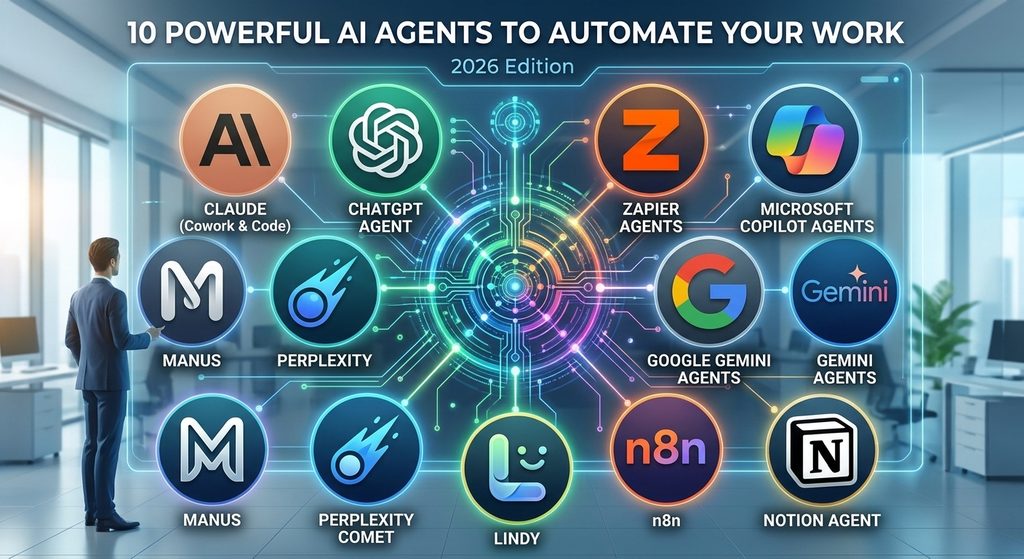
10 Powerful AI Agents to Automate Your Work
Each tool below has its own strengths. Features change quickly, so double-check current details on each company’s website before you commit.
1. Claude (Claude Cowork and Claude Code)
Claude from Anthropic is a strong choice for knowledge work and coding. Claude Cowork is a desktop app that helps non-developers delegate tasks involving files, documents, and research. Claude Code helps developers hand off coding jobs from the command line. Claude can also work inside tools like Excel, Chrome, and Google Workspace.
Best for: Document work, research, data cleanup, and software development.
Pro tip: Start with one well-defined task, like turning messy notes into a clean report, and build from there.
2. ChatGPT Agent
OpenAI’s ChatGPT can now handle multi-step tasks using its own browser and tools. It can research a topic, build a slide deck, or fill out online forms. Because millions of people already use ChatGPT, the learning curve is gentle.
Best for: General-purpose tasks, web research, and quick presentations.
Pro tip: Ask it to show its plan first. You can catch wrong turns before they waste time.
3. Zapier Agents
Zapier has long been the king of connecting apps. Its AI agents build on that strength. They can work across thousands of apps, so one agent can read a form submission, update a spreadsheet, and ping your team in Slack.
Best for: Small businesses and teams that already rely on many apps.
Pro tip: Start with a simple workflow, such as lead intake, and add steps over time.
4. Microsoft Copilot Agents
If your company lives in Microsoft 365, Copilot agents are a natural fit. They work with Outlook, Teams, Word, Excel, and SharePoint, and they can follow company data permissions. That makes them popular in larger organizations.
Best for: Enterprise teams using Microsoft tools every day.
Pro tip: Build an agent for one repeated process, like onboarding questions, and share it with your team.
5. Google Gemini Agents
Gemini works closely with Gmail, Docs, Sheets, Calendar, and Drive. It can summarize long email threads, draft documents, and help organize your schedule. For people who already use Google Workspace, setup is quick.
Best for: Google Workspace users who want help inside the apps they already know.
Pro tip: Use it to turn long email chains into short action lists.
6. Manus
Manus became well known as a general-purpose autonomous agent. You describe a goal, and it works through the steps on its own in a cloud environment. People use it for research, reports, and simple web projects.
Best for: Hands-off research and project drafts.
Pro tip: Give it a clear finish line, like “a five-page summary with sources,” so it knows when it’s done.
7. Perplexity Comet
Comet is an AI-powered browser from Perplexity. Its built-in assistant can summarize pages, compare products, and handle browsing tasks for you. Since it lives inside the browser, it’s handy for anyone who spends the day on the web.
Best for: Research-heavy roles, shopping comparisons, and fast fact-finding.
Pro tip: Use it to compare several sources side by side, then verify key facts yourself.
8. Lindy
Lindy lets you build AI assistants without writing code. You can create agents that manage your inbox, book meetings, and follow up with leads. The interface feels friendly, even if you’ve never built automation before.
Best for: Solo workers and small teams who want no-code automation.
Pro tip: Begin with email triage. It’s a quick win and builds confidence.
9. n8n
n8n is a flexible workflow automation platform that supports AI agents. It’s popular with technical users because you can self-host it and customize it deeply. You get more control over data and logic than many simpler tools offer.
Best for: Developers and technical teams who want control and flexibility.
Pro tip: Use it when privacy matters and you’d rather keep data on your own servers.
10. Notion Agent
Notion’s AI agent works inside your workspace. It can draft pages, update databases, and organize notes and projects. If your team already plans work in Notion, an agent there keeps everything in one place.
Best for: Project management, note-taking, and internal documentation.
Pro tip: Let it clean up meeting notes and turn them into tasks automatically.
Quick Comparison of the Top AI Agents
| AI Agent | Best For | Skill Level | Standout Strength |
|---|---|---|---|
| Claude | Documents, coding, research | Beginner to advanced | Strong reasoning and file work |
| ChatGPT Agent | General tasks | Beginner | Familiar, easy to use |
| Zapier Agents | App-to-app workflows | Beginner to intermediate | Huge app library |
| Microsoft Copilot | Enterprise teams | Beginner | Deep Microsoft 365 links |
| Google Gemini | Workspace users | Beginner | Works inside Google apps |
| Manus | Autonomous projects | Beginner | Hands-off execution |
| Perplexity Comet | Web research | Beginner | AI built into the browser |
| Lindy | No-code assistants | Beginner | Friendly setup |
| n8n | Custom automation | Intermediate to advanced | Self-hosting and control |
| Notion Agent | Team workspaces | Beginner | Lives where your notes live |
How to Choose the Right AI Agent
With so many options, picking one can feel overwhelming. A few simple questions make it much easier.
Match the Agent to the Task
Start with the job, not the tool. Ask yourself what eats up the most time each week. If it’s email and calendars, an assistant like Gemini or Lindy may fit best. If it’s connecting business apps, look at Zapier or n8n. If it’s research and documents, Claude or ChatGPT are strong starting points. You can also compare options in our AI automation tools roundup.
Check Security and Cost
AI agents often touch sensitive data, so look closely at privacy policies. Find out where your data goes, who can see it, and whether the tool respects your company’s rules. Also compare pricing. Some tools charge per user, while others charge by usage, and costs can climb if an agent runs often.
How to Get Started With AI Agents
You don’t need to be a tech expert. Here’s a simple path anyone can follow:
- List your repetitive tasks. Write down everything you do more than once a week.
- Pick one small task. Choose something low-risk, like summarizing notes.
- Choose a beginner-friendly agent. Try a free plan or trial first.
- Write clear instructions. Say what you want, what good looks like, and what to avoid.
- Review the first results. Check accuracy and fix your instructions as needed.
- Add approvals for important actions. Keep a human in the loop for emails, payments, and deletions.
- Scale up slowly. Once you trust the results, give the agent more to do.
This steady approach builds good habits and protects you from costly mistakes. For wording ideas, see our guide to writing better AI prompts.
Risks and Best Practices
AI agents are powerful, so a little caution goes a long way. Keep these tips in mind:
- Verify important facts. Agents can sound confident while being wrong.
- Limit access. Give agents only the permissions they truly need.
- Protect sensitive data. Avoid sharing passwords, financial details, or private client information unless the tool is approved for it.
- Keep approvals on. Require your sign-off before an agent sends messages or spends money.
- Watch for prompt injection. Malicious web content can try to trick agents, so be careful when they browse unfamiliar sites.
- Review regularly. Check logs and outputs so small errors don’t pile up.
Following these steps lets you enjoy the time savings while staying in control.
Frequently Asked Questions
What are AI agents in simple terms?
AI agents are smart programs that complete tasks for you. You give them a goal, and they plan the steps, use tools, and take action. They go beyond answering questions by actually doing the work.
Are AI agents safe to use at work?
They can be, if you use them wisely. Choose trusted providers, read the privacy terms, limit what the agent can access, and keep human approval on important actions. Always follow your company’s policies.
Will AI agents replace human workers?
Most experts expect agents to change jobs rather than erase them. They take over repetitive tasks, while people focus on judgment, creativity, and relationships. Learning to work with AI agents is quickly becoming a valuable skill.
Do I need coding skills to use AI agents?
No. Many tools, like Lindy, Zapier Agents, ChatGPT, and Notion, are designed for non-technical users. Coding skills help if you want deeper customization with platforms like n8n, but they’re not required to get started.
How much do AI agents cost?
Pricing varies a lot. Many offer free tiers or trials, while paid plans often run on monthly subscriptions or usage-based pricing. Check each provider’s website for current prices, since they change often.
How much time can AI agents really save?
It depends on your work. Many people report saving several hours a week on tasks like email, research, and reporting. Your results will grow as you refine your instructions and automate more of your routine.
Conclusion
AI agents are one of the most practical tech shifts of our time. They handle the repetitive tasks that drain your energy, so you can spend your hours on work that really matters. From Claude and ChatGPT to Zapier, Gemini, and n8n, there’s an option for nearly every skill level and budget.
The smartest move is to start small. Pick one task, choose one tool, and test it for a week. Once you see the hours come back, you’ll be excited to automate more. The future of work looks bright, and AI agents can help you step into it with confidence.