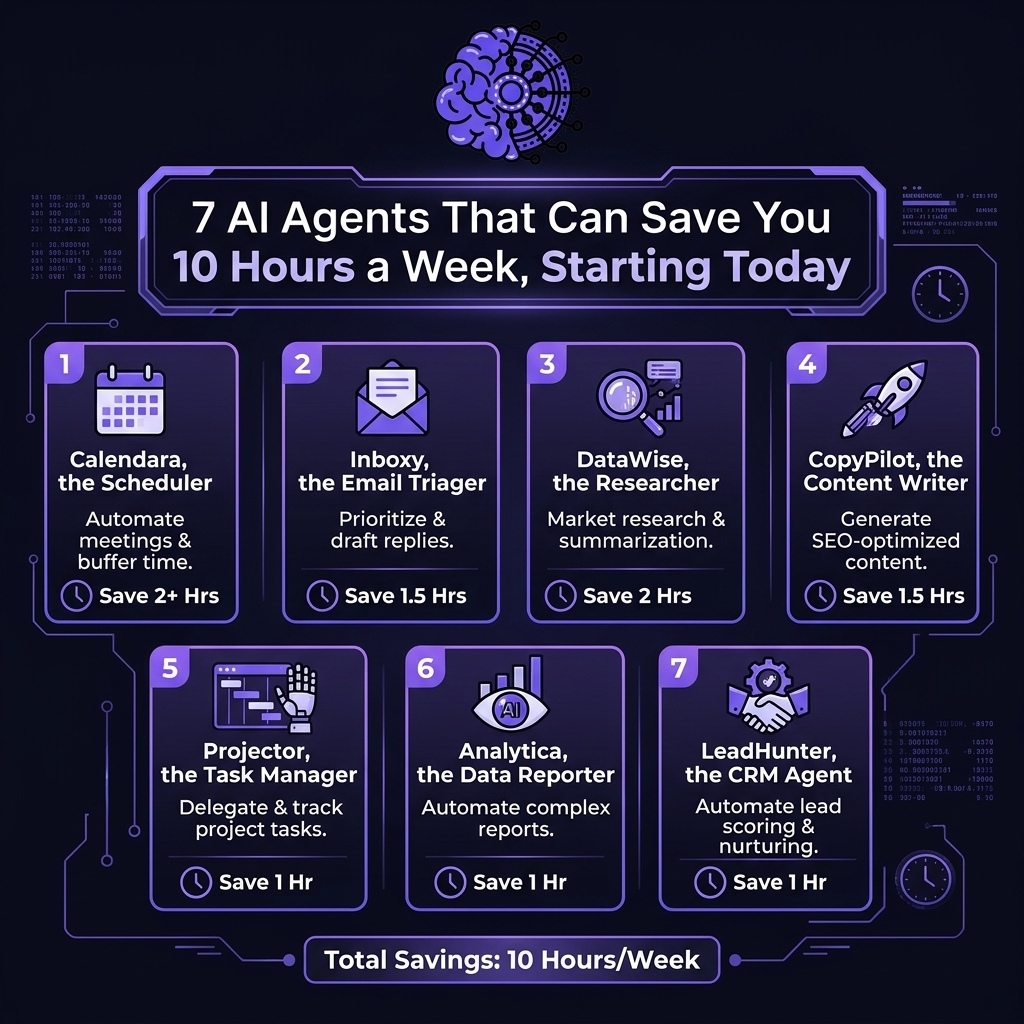
Why AI Agents Are Changing the Way We Work
Let’s be honest: most of us don’t spend our weeks doing the work we love. We spend them sorting email, moving meetings around, and copying numbers from one spreadsheet into another. These tasks aren’t hard, but they’re endless. Over time, they quietly eat up a huge part of the workweek.
That’s where AI agents come in. These tools don’t just answer questions. They take action. They can read your inbox, draft replies, book meetings, gather research, and build reports, all with little input from you. The result is more time for thinking, creating, and connecting with people.
The good news is that you don’t need to be a programmer to benefit. Many AI agents are now simple enough for students, freelancers, and small business owners. In fact, research from firms like McKinsey & Company shows that businesses are adopting AI at a fast pace, and individuals are following close behind.
In this guide, you’ll learn what AI agents are, which seven types can save you the most time, and how to start using them today. We’ve also added practical tips, a comparison table, and a full FAQ section. By the end, you’ll have a clear plan for reclaiming up to 10 hours every week.
What Are AI Agents, Exactly?
An AI agent is a software program that uses artificial intelligence to complete tasks on your behalf. You give it a goal, such as “clear my inbox of routine messages,” and it figures out the steps. Then it carries them out, often across several apps.
Think of an AI agent as a very fast, very patient assistant. It doesn’t get tired, and it doesn’t forget the small details. However, it still needs clear instructions and a bit of supervision, just like a new team member would.
Most AI agents share a few core abilities:
- Understanding goals: They interpret plain-language instructions.
- Planning: They break big tasks into smaller steps.
- Taking action: They use tools like email, calendars, and databases.
- Learning from feedback: They improve as you correct them.
How AI Agents Differ From Chatbots
You’ve probably used a chatbot before. You type a question, and it types an answer. That’s useful, but it’s a one-step exchange. You still have to take the answer and do something with it.
AI agents go further. A chatbot might suggest three times for a meeting. An agent will check everyone’s calendar, pick the best slot, send the invite, and add a reminder. In short, chatbots talk, while AI agents act.
That difference matters for your time. When a tool only advises, you’re still doing the work. When a tool acts, you’re free to move on.
Where the 10 Hours Come From
You may wonder whether “10 hours a week” is realistic. Here’s a simple, conservative breakdown for a typical office worker or freelancer:
| Task | Typical Weekly Time | Time Saved With AI Agents |
|---|---|---|
| Email sorting and replies | 5 hours | 2 hours |
| Scheduling and reminders | 2 hours | 1.5 hours |
| Research and fact-finding | 4 hours | 2 hours |
| Meeting notes and follow-ups | 3 hours | 1.5 hours |
| Customer questions | 3 hours | 1 hour |
| Drafting content | 4 hours | 1 hour |
| Reports and data entry | 3 hours | 1 hour |
| Total | 24 hours | 10 hours |
Your numbers will vary, of course. Still, even saving half of this estimate would give you a full extra workday each month. And for many people, the savings grow as they get comfortable with their tools.
The 7 AI Agents That Give You Your Week Back
Now for the heart of the matter. Each of the AI agents below targets a common time-drain. You don’t have to adopt all seven at once. Start with the one that fits your biggest headache, then add more as you go.
1. The Email Triage Agent
Email is the classic time thief. An email triage agent reads incoming messages, sorts them by priority, and drafts replies for the routine ones. It can also unsubscribe you from junk and flag anything that needs your personal attention.
Here’s how it helps in practice:
- It labels messages as urgent, routine, or low priority.
- It writes draft replies in your own tone.
- It summarizes long threads into two or three sentences.
- It reminds you about messages you haven’t answered.
Estimated time saved: about 2 hours a week. Many people find this is the easiest win among all AI agents, because the results show up within a day.
2. The Smart Scheduling Agent
Booking a single meeting can take six emails. Multiply that by a busy week, and you’ve lost hours to “Does Tuesday work?” A scheduling agent removes that back-and-forth completely.
It looks at your calendar, learns your habits, and offers times that fit. For instance, it can protect your focus time, avoid back-to-back calls, and adjust for different time zones. This feature is a lifesaver if you work with international clients.
Estimated time saved: about 1.5 hours a week. Better still, you’ll feel less mental clutter, since you’re no longer juggling dates in your head.
3. The Research Agent
Research used to mean opening twenty tabs and hoping for the best. A research agent does the heavy lifting. You ask a question, and it searches, reads, compares sources, and delivers a clear summary with links.
This type of agent is great for:
- Market and competitor research
- Background reading for school or work
- Fact-checking claims before you publish
- Finding quotes, statistics, and examples
One important tip: always check the sources it gives you. Good AI agents show where their information came from, which makes verification quick. Trust, but verify.
Estimated time saved: about 2 hours a week.
4. The Meeting Notes Agent
Taking notes while trying to take part in a conversation is tough. A meeting notes agent joins your call, records the discussion (with everyone’s permission), and produces a tidy summary. It lists decisions, action items, and who’s responsible for what.
Afterward, it can even send follow-up emails to attendees. That means no more spending thirty minutes after every meeting writing recaps. Plus, you’re able to focus fully on the conversation while it’s happening.
Estimated time saved: about 1.5 hours a week. If your calendar is packed with calls, you’ll likely save even more.
5. The Customer Support Agent
If you run a business, a shop, or a service, customer questions can pile up fast. A support agent answers common questions around the clock. It handles things like order status, pricing, opening hours, and basic troubleshooting.
When a question is too tricky, the agent passes it to you with a short summary, so you don’t have to start from scratch. Customers get quick replies, and you get your evenings back. As a result, everyone wins.
Estimated time saved: about 1 hour a week for small businesses, and far more for larger ones. Among the AI agents on this list, this one often improves customer satisfaction too.
6. The Content Drafting Agent
Staring at a blank page is exhausting. A content drafting agent gives you a starting point in seconds. It can write first drafts of social posts, newsletters, product descriptions, and reports.
Of course, you’ll want to edit the result. The agent’s job isn’t to replace your voice. Instead, it removes the hardest part, which is getting started. You can then shape the draft, add your own stories, and polish the final version.
To get better results, try these tips:
- Share a sample of your past writing so the agent can match your style.
- Give clear instructions about audience, length, and tone.
- Ask for two or three versions, then pick the best parts of each.
Estimated time saved: about 1 hour a week, and often more for frequent writers.
7. The Data and Reporting Agent
Few jobs are as dull as copying numbers between spreadsheets. A data and reporting agent connects to your tools, pulls the numbers, and builds charts and summaries automatically. Some can even write a plain-English explanation of what the numbers mean.
For example, you might ask, “Show me last month’s sales compared with the month before, and tell me what changed.” The agent does the math, builds the chart, and flags anything unusual. This kind of automation cuts errors, too, since there’s less manual typing.
Estimated time saved: about 1 hour a week. It’s a strong choice among AI agents if you manage budgets, marketing results, or client reports.
How to Choose the Right AI Agents for Your Work
With so many options out there, picking the right tools can feel overwhelming. Fortunately, a few simple questions can guide you.
First, ask yourself where your time actually goes. Track your week for just three days. Note every repetitive task, then circle the ones that are boring, frequent, and rule-based. Those are perfect candidates for AI agents.
Next, compare your options using a short checklist:
| Factor | What to Look For |
|---|---|
| Ease of use | Can you set it up in under an hour? |
| Integrations | Does it work with your email, calendar, and apps? |
| Privacy | Does it explain how your data is stored and used? |
| Control | Can you review its work before it acts? |
| Cost | Is there a free trial or a fair monthly price? |
| Support | Are there guides, tutorials, or a help team? |
Finally, start small. Choose one agent, test it for two weeks, and measure the time you save. If it works, keep it and add another. If it doesn’t, you’ve lost very little and learned a lot.
How to Get Started Today in Four Steps
You really can begin this afternoon. Here’s a simple plan that works for most people.
- Pick one painful task. Choose the chore you dread most, such as email or scheduling.
- Choose a trusted tool. Look for well-reviewed AI agents with a free trial, so you can test without risk.
- Set clear rules. Tell the agent what it can do alone and what needs your approval. For example, let it draft replies but not send them at first.
- Review and adjust weekly. Spend ten minutes each Friday checking its work. Correct mistakes, and the agent will usually improve.
Notice that you’re staying in charge the whole time. That’s the secret to success with AI agents. You aren’t handing over your work blindly. You’re building a partnership, step by step.
Also, keep a simple log. Write down how long a task used to take and how long it takes now. After a month, you’ll have real proof of your savings, and you’ll know which tools deserve a permanent spot in your routine.

Risks and Best Practices for Using AI Agents
Like any powerful tool, AI agents come with a few risks. Knowing them ahead of time helps you stay safe and get better results.
Accuracy. AI can make mistakes or state wrong facts with confidence. Always double-check anything important, especially numbers, names, and legal or medical information.
Privacy. Don’t share sensitive details, such as passwords, bank numbers, or private client data, unless you’ve read the tool’s privacy policy and trust it. When in doubt, leave it out.
Over-reliance. It’s tempting to let AI agents do everything. However, your judgment and creativity are the parts that matter most. Use agents for the routine work, and keep the thoughtful work for yourself.
Transparency. If you use an agent to talk with customers or colleagues, be honest about it where appropriate. People generally appreciate openness.
Here’s a quick list of best practices to follow:
- Start with low-risk tasks before moving to important ones.
- Keep a human in the loop for anything high-stakes.
- Review the agent’s work regularly.
- Update your instructions as your needs change.
- Stay curious, because these tools improve quickly.
With these habits in place, you’ll enjoy the benefits of AI agents while avoiding the common pitfalls. And since the technology keeps getting better, the future looks bright for anyone willing to learn.
Frequently Asked Questions
1. What are AI agents in simple terms?
AI agents are smart programs that complete tasks for you instead of just giving advice. You tell them your goal, and they plan the steps and take action, such as sorting email or booking a meeting.
2. Do I need technical skills to use AI agents?
No. Many AI agents are designed for everyday users and work with plain-language instructions. If you can write an email, you can probably set up a basic agent.
3. Are AI agents safe to use with my personal data?
It depends on the tool. Read the privacy policy, check how your data is stored, and avoid sharing highly sensitive information. Choose providers that explain their security practices clearly.
4. Can AI agents really save 10 hours a week?
For many people, yes, especially if their work involves a lot of email, meetings, and reports. Results vary, so start with one or two agents and measure your own savings over a few weeks.
5. Will AI agents replace my job?
It’s unlikely that agents will replace people who use them well. They’re better at routine tasks, while humans excel at creativity, empathy, and judgment. Learning to work with AI agents can actually make you more valuable.
6. How much do AI agents cost?
Prices range widely. Many tools offer free plans or trials, while advanced features usually cost a monthly fee. Start with a free option, and upgrade only when you’ve proven the value.
7. What’s the best first agent to try?
An email triage agent is a popular starting point. Email is a daily pain for almost everyone, and the time savings show up quickly.
Conclusion
Time is the one resource none of us can buy more of. Yet with the right AI agents, you can take back hours that were slipping away on small, repetitive tasks. From email triage and scheduling to research, meeting notes, support, writing, and reporting, each of the seven agents we’ve covered targets a real time-drain.
You don’t need to change everything overnight. Pick one task, try one tool, and set clear rules. Review the results each week, and build from there. Before long, you could be saving 10 hours or more, and spending them on work and moments that truly matter.
The future of work is optimistic, and it’s already here. Why not take the first step today?